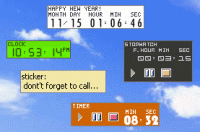
TimeLeft is skinnable clock, tray clock, countdown, reminder, stopwatch, timer, sticker and time synchronization utility. TimeLeft is attractive, easy to use and highly configurable. Watching seconds ticking away makes some glad event so much closer
TimeLeft is a clock, tray clock, countdown, reminder, alarm clock, stopwatch, timer, desktop sticker and time synchronization utility. TimeLeft uses Winamp skins to show digits and text. TimeLeft is attractive, easy to use, and highly configurable - it's a really beautiful software.
The main feature of TimeLeft is a powerful customizable reminder, which can alarm you at a specific moment of time or run periodically (minutely, hourly, daily, weekly, monthly or annually). It can also remind you before a specified event or keep on reminding after it. Reminder can show a message, play music or open a link/document, execute an application or shutdown your PC. Numerous other options are also available: multireminder, time bounds etc.
One more beautiful TimeLeft feature is a customizable countdown, which lives on your desktop and shows the amount of time left to (or passed after) the specified event. Countdown may be easily used in a businesslike way, to remind you of forthcoming events (meetings etc.) or job to be done. But even if you are not a business type of person, you can still use TimeLeft to just add some extra excitement to your life watching how the time left to some eagerly awaited event (be it a cruise or your friend's visit) is getting less and less.
Other TimeLeft features include:
clock, stopwatch, timer, desktop sticker, time synchronization, placing countdown on a web-page and more.
Whats new in version 3.65:
major update
Requirements:
A standard Windows PC
Operating system:
Win95,Win98,WinME,WinNT 4.x,WinXP,Windows2000,Windows2003,Windows Vista Starter,Windows Vista Ultimate,Unix,Linux,Mac OS X 10.4,Mac OS X 10.5
Limitations:
none
Release notes:
Major Update
Other version information:
| Software |
Version |
Release date |
File size |
| TimeLeft | 3.57 | 2012-01-06 | 2293 KB |

Useful Windows Tool for exact time measurement (Stopwatch) or for running a countdown. With a resolution of up to a thousandth of a second and self adjusted display color and size. Unlimited storable interims, COM/OLE- and serial-line-control
Price: $19.90, Rating: 10, Downloads: 106
Download 
 TimeLeft 3.65 details